Oversight Dashboard
One place to watch usage, interview quality, and AI governance health across your organization.
The Oversight dashboard rolls up how your team is using the platform, how strong your captured interviews are, and how healthy your AI governance estate is. It is admin only, and it spans every project in your organization by default so leaders can see the whole picture without digging through individual workspaces. This page was previously called "Analytics."
Opening Oversight
Access requires the Manage Organizationadmin permission. Users without it see a "not authorized" message instead of the dashboard.
Activity Tab
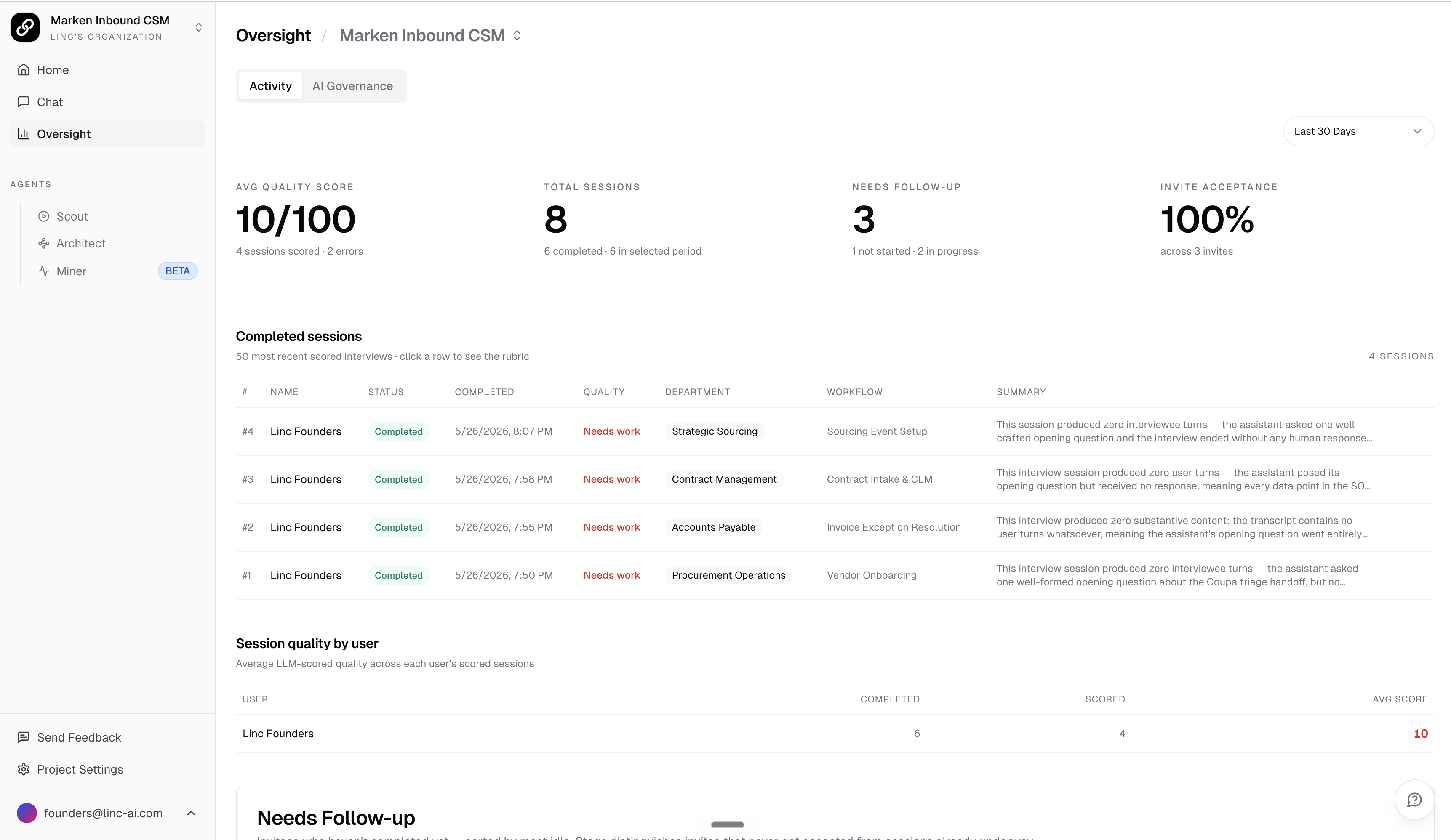
The Activity tab leads with interview health, then exposes assistant usage below it. A time range selector in the top right scopes the metrics to the last 7, 30, or 90 days (30 days by default).
Interview Quality Signals
The headline metrics focus on the interviews your team is capturing:
- Avg Quality Score -the average LLM-scored quality (out of 100) across scored sessions, with a count of scored sessions and any scoring errors.
- Total Sessions -all interview sessions, broken out by completed sessions and those completed in the selected period.
- Needs Follow-up -invitees who have not finished, grouped by stage (not accepted, expired, not started, in progress).
- Invite Acceptance -the share of interview invites that were accepted or completed, across all invites sent.
Below the headline numbers, a Completed sessions table lists the most recent scored interviews. Click any row with a rubric to expand the full quality breakdown: the narrative, flags, per-axis scores, and category coverage. A Session quality by user table shows average score, completed, and scored counts per person, and a Needs Follow-up table lets you resend or cancel outstanding invitations directly.
Assistant Usage
Expand the Chat Activity section to see how your team is using the in-platform assistant. This includes:
- Total Chats and Total Messages, with active and recent counts for the selected period.
- Satisfaction Rate derived from upvotes and downvotes, plus a vote distribution chart.
- Avg Messages per Chat and storage usage (total used, files, and collections).
- Daily Activity trends and an Hourly Distribution chart showing when users are most active.
- Active Users over time (click a bar to see who was active that day) and a per-user breakdown by chats, messages, storage, and satisfaction.
- Top Chats ranked by engagement, with message counts and vote totals.
AI Governance Tab
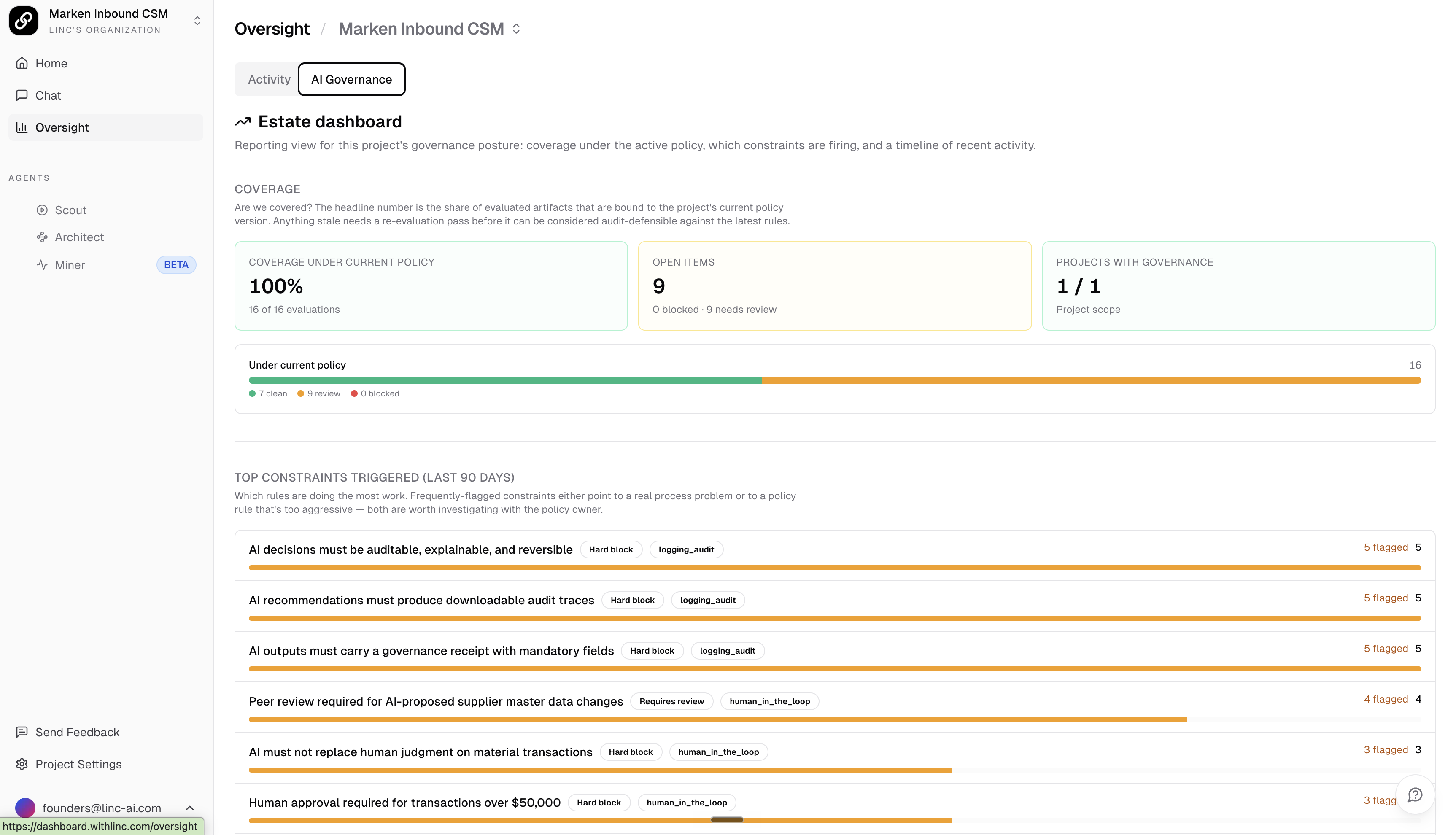
The AI Governance tab is an estate-wide, read-only reporting view of your governance posture. It answers three questions for the people responsible for AI oversight: are we covered, is the policy doing useful work, and what just happened. To act on any item, use the review queue rather than this dashboard.
Coverage
The headline coverage number is the share of evaluated AI artifacts bound to each project's current policy version. Anything still under a prior policy is flagged as stale and needs a re-evaluation pass to stay audit-defensible. Alongside it you get Open items (blocked plus needs-review counts) and Projects with governance (how many projects have a policy binding). A status bar breaks the estate into clean, needs review, and blocked, and an org-wide view adds a per-project breakdown table.
Top Constraints Triggered
This block ranks the policy constraints that fired most often over the last 90 days, with flagged and violated counts and a severity label (hard block, requires review, advisory). Frequently triggered constraints point either to a real process problem or to a rule that is too aggressive, both worth a look with the policy owner.
Recent Activity
A chronological audit log of evaluations, reviewer decisions, and policy version activations. Click any row tied to an artifact to open its governance receipt.
Who Should Watch This
Oversight is built for organization admins and AI oversight leaders such as a CIO or CAIO. Use the Activity tab to keep interview capture on track and adoption healthy, and the AI Governance tab to confirm coverage, watch which constraints are firing, and keep an audit trail of governance activity across every project.